Spotlight › WireFleet
Two PCs, two fleets, one winner
WireFleet is a naval battle game for two PCs joined by a serial cable. Each player hides five ships on a grid and fires at the other's, one shot a turn, and neither computer ever learns where the other's ships are until they are hit.
- over the cable
- 2,400 baud
- each fleet
- 5 ships, 17 squares
- on the disk
- 26 KB
It draws in colour on VGA and EGA, in four colours full screen on CGA, and in black and white on CGA and Hercules desktops.
What it is
A pencil-and-paper game, played across a cable.
The game is older than computers. Two players each draw a grid, hide a fleet of ships on it, and take turns calling out squares on the other's grid. The other player answers hit or miss. The first to sink every ship wins. It was sold as Battleship from 1967.
WireFleet plays it between two PCs. The cable is a null modem: a serial cable with its send and receive wires crossed, so that what one computer sends the other receives. Plug it into COM1 or COM2 on each PC and open WireFleet on both. Each one looks for the other on both ports by itself, so a serial mouse can stay plugged into the other port, and there is nothing to set up.
Each player places five ships on a 10 by 10 grid: a carrier five squares long, a battleship of four, a cruiser and a submarine of three, and a destroyer of two. Ships may touch but not overlap. Click a square to place one, R turns it, and A places the whole fleet at random. When both players press Y, the battle starts.
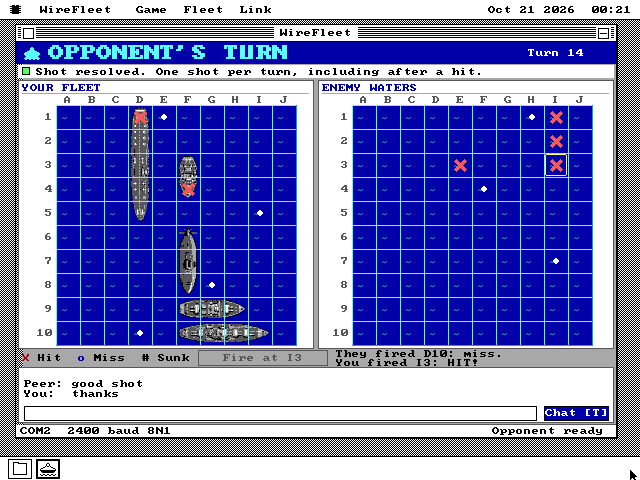
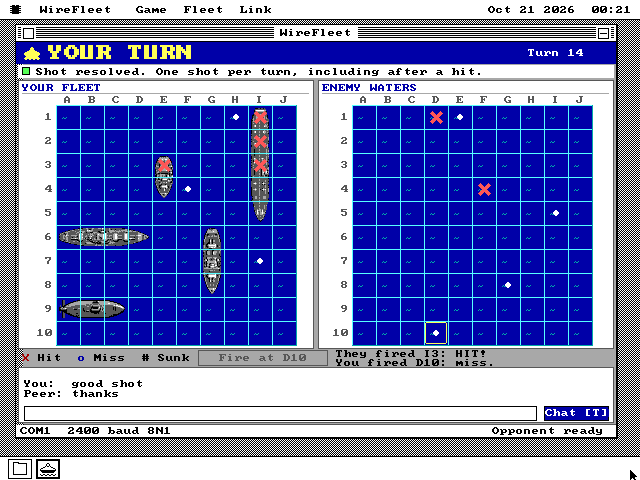
You get one shot a turn, even after a hit. A hit is a red cross, a miss is a white dot, and a sunk ship is marked in full. Press T to type a short message to your opponent. The first to hit all 17 squares of the other fleet wins.
See it running
Placing a fleet, and one battle seen from both sides.
![The WireFleet window with a navy banner reading DEPLOY YOUR FLEET and the line Opponent found! Place your fleet, then Ready [Y]. On the left, YOUR WATERS: a 10 by 10 navy grid with five grey ships placed. On the right, YOUR SHIPS: the carrier, battleship, cruiser, submarine and destroyer, each with a picture and a ticked box, 5 / 5 placed, the buttons Horiz. [R], Auto [A] and Clear [C], and a large green READY [Y] button.](/img/wirefleet/wf-deploy.png)
How it works
A secret on each side of the cable.
Your ships never cross the cable
A shot goes across as a square. The PC it was fired at looks at its own fleet and sends back hit, miss or sunk. So neither machine holds the other's fleet, and nothing on the cable gives it away.
Every message carries a checksum, the match it belongs to and the turn. A damaged, repeated or stray message is thrown away, and one that goes missing is sent again, so a shot counts once.
2,400 baud, for an original PC
The serial chip in an original IBM PC holds one received byte. At 9,600 baud the next arrives a millisecond later, and two emulated XTs linked that fast lost about one byte in eleven. At 2,400 a byte waits four milliseconds, which a 4.77 MHz 8088 has time for.
The game borrows the port from the system while it runs and gives it back when it closes, so the mouse keeps working on the other port.
The battle waits
If the cable goes quiet, firing pauses. Both fleets, the shots so far and any shot still waiting for an answer stay where they are, and play carries on when the cable is back.
S saves the match on each PC and O loads it, so a battle can be finished another day. The two saved files must belong to the same match, or the game refuses to guess whose board to keep.
What it does not do
Where it stops, and why.
- It needs two PCs. There is no computer opponent to play on one.
- It plays over a cable only. There is no modem or network match, and the two PCs need to be close enough for one serial cable.
- It uses the standard COM1 and COM2 ports. A USB serial adapter will not work.
- Both PCs need this release of os8088 or later. The Wire on an older system disk shows it as needing a newer Wire.
- A saved match holds your own fleet, so it is not a file to give to your opponent.
Run it
It is on the software disk, in the games folder.
-
Connect a null modem cable between COM1 or COM2 on each PC. On a 9-pin plug, pins 2 and 3 are crossed and pin 5 goes straight through; on a 25-pin plug, 2 and 3 crossed and 7 straight.
-
On each PC, boot os8088 with the software disk in the second drive, double-click Disk B and open the GAMES folder.
-
Double-click WIREFLET.O88 on both. If the mouse has not moved yet, move it once so the system can tell it from the cable.
-
Place your ships, or press A, then press Y on both. The PC whose banner says YOUR TURN fires first: click a square in the enemy waters, or move there with the arrows, and press Enter.
It is on every software disk, including apps360.img and games360.img for a 360KB XT, on the live USB image and CD, and in The Wire. H shows the keys. With the os8088 source, make wirefleet-pair opens two connected XTs in the 86Box emulator.