Boot it in your browser

This runs the real thing. The same 1.44MB floppy image on the download page is fed to an emulated PC in this tab, boots its own 512-byte boot sector, and puts up the desktop. Nothing is faked and nothing is pre-rendered.

The emulator is about 2.4MB of JavaScript and WebAssembly, so it only loads when you ask for it. The two floppies together are 16KB on the wire -- they are mostly zeroes, and they ship compressed.

os8088 -- emulated IBM PC
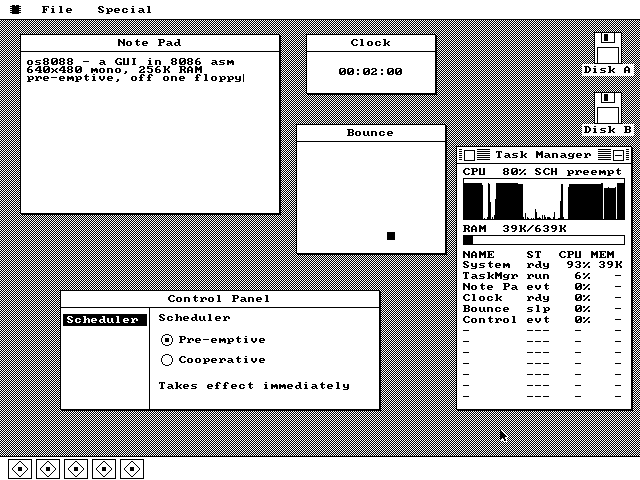
The os8088 desktop with a Note Pad, a Clock, a Bounce window, the Control Panel and the Task Manager open at once, and a dock along the bottom.

Not started.

What to try

  • Pull down a menu. Press and hold on File in the menu bar, drag down through the items, release on the one you want. Menus track the mouse the whole way down, the way they did in 1984 -- releasing outside cancels.
  • Open a Clock and a Bounce. Then open another of each. They keep ticking and bouncing while you drag a third window around; that is the timer interrupt switching between them.
  • Drag a window by its title bar. The window stays put and an outline follows you until you let go.
  • Load a program off the second floppy. File > Disk, then double-click MINES. Press F for flag mode and N for a new game.
  • Turn multitasking off. System > Control Panel, switch the scheduler to Cooperative, and watch what happens to the clocks. Switch it back.

How the mouse works here

os8088 has no PS/2 mouse driver, because the PS/2 port did not exist when the PC/XT shipped. It drives a Microsoft serial mouse on COM1 at 1200 baud -- and the emulator has no serial mouse of its own. So this page synthesises one: every pointer movement over the screen is encoded into the same three-byte packets a real Microsoft mouse would have put on the wire, and fed one byte at a time into the emulated UART.

They have to go one at a time. The OS reads exactly one byte per interrupt, and the emulator's interrupt controller is edge-triggered -- hand it all three bytes at once and the line never produces another edge, so the mouse dies after the first movement. The pump waits for the receive queue to drain before offering the next byte. There is more about the protocol on the mouse page.

Because a serial mouse only ever reports relative motion, the arrow on the emulated screen and your actual pointer can drift apart. Two fixes: Capture pointer locks them together properly, and Re-sync pointer shoves the arrow into the corner the OS clamps at and walks it back to the middle.

If it does not work

  • It needs WebAssembly. Any browser from the last several years has it, but a strict Content-Security-Policy without 'wasm-unsafe-eval' will block it silently.
  • Sound is disabled. os8088 does not make any anyway.
  • The emulated machine is given 1MB of RAM rather than the 256KB the OS actually needs, because the emulator loads its BIOS into main memory below the 1MB line. The OS itself only ever touches the boot sector at 0x07C00, its own segment at 0x10000-0x1EFFF, the menu save-under scratch at 0x20000, and the video memory at 0xA0000.
  • This is an emulated modern-speed PC, not a 4.77MHz XT. On real period hardware you can watch the windows repaint. If you want that experience, the 360KB image in 86Box is the honest version.

Download it instead Screenshots