Spotlight › Kernel in ROM and the HMA
Part of the kernel in ROM, or above 1MB
The original IBM PC has five ROM sockets on its motherboard that almost nobody uses. os8088 can now run 37KB of its kernel from a ROM in those sockets. On a 286 or later it does the same from the memory just above 1MB, with no new hardware. Either way, programs get those 37KB back.
- free memory, 128KB PC
- 32KB to 69KB
- ROM space used
- 40KB in 5 sockets
- 286 or later
- 37KB, from a file
Why memory is short
What RAM and ROM were on a 1981 PC, and where 37KB can come from.
RAM and ROM
A PC has two kinds of memory. RAM is the memory programs read and write. It forgets everything when the power goes off. ROM, read-only memory, is a chip whose contents were fixed when it was made. The processor can run programs out of it, but nothing can change them, and they survive with the power off.
The 8088 processor in the first IBM PC can reach 1MB of addresses. The bottom 640KB of that is set aside for RAM. The top is for the screen's memory and for ROM. The most important ROM is the BIOS: the built-in program that tests the machine at power-on and starts the operating system from a disk.
Five sockets that sit idle
The IBM PC 5150's motherboard has six ROM sockets, each holding 8KB. One, U33, holds the BIOS. Four more, U29 to U32, hold Cassette BASIC: a BASIC interpreter that starts when no disk boots. It saves programs to a cassette recorder. Once floppy drives were normal, almost nobody used it. The last socket, U28, ships empty.
Those five sockets, U28 to U32, answer one unbroken 40KB block of addresses, from F4000 to FDFFF. A chip programmed with something else can go there instead of BASIC.
Why 128KB is tight
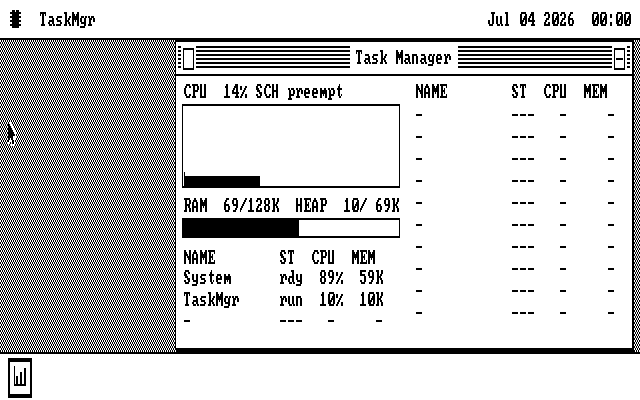
os8088 runs on a PC with as little as 128KB of RAM. Its standard kernel, the core of the system that is always in memory, takes 95KB of that. On a 128KB machine, programs get the 32KB that is left. There is also a small kernel for these machines, which leaves 67KB.
The kernel is built in two parts. One part has to stay at a fixed place in memory. The other part, 37KB on the standard kernel and 21.5KB on the small one, is written so that it can run from any address. It holds the file system, the file dialog, the memory manager, the desktop and the driver loader. Because it can run from anywhere, it can run from a ROM. The RAM it would have used then goes to programs.
The memory just above 1MB
An 8088 has 20 address lines, which is where its 1MB limit comes from. The way it builds an address can point a little past the top, up to 65,519 bytes beyond 1MB. With only 20 lines, those addresses wrap around to the bottom of memory.
A 286 has more address lines. With the 21st one, called A20, switched on, those same
addresses reach real memory above 1MB, without leaving the mode the PC normally runs in. That
block, 64KB less 16 bytes, is the High Memory Area, or HMA. DOS 5 used it for its
DOS=HIGH setting. On a 286 or later with memory above 1MB, os8088 now puts the
same 37KB part of its kernel there.
The idea is an old one. The first Apple Macintosh kept much of its system software in a 64KB ROM rather than in its 128KB of RAM. The question here was whether an IBM PC could do the same with sockets it already has.
See the difference
The same machine and the same disk, with and without. The Task Manager's memory line is the number to read.
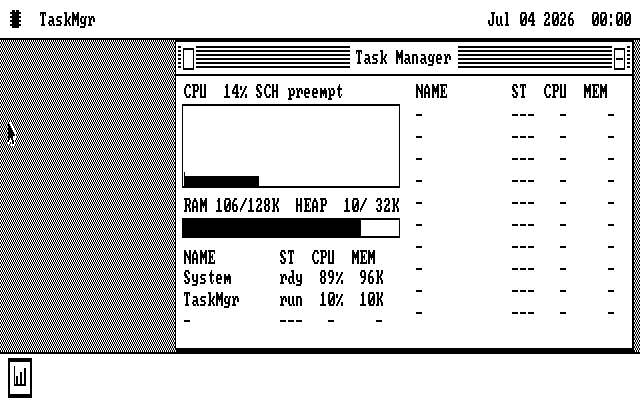
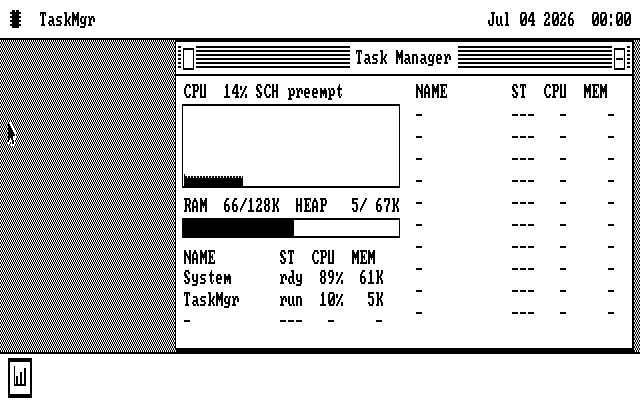
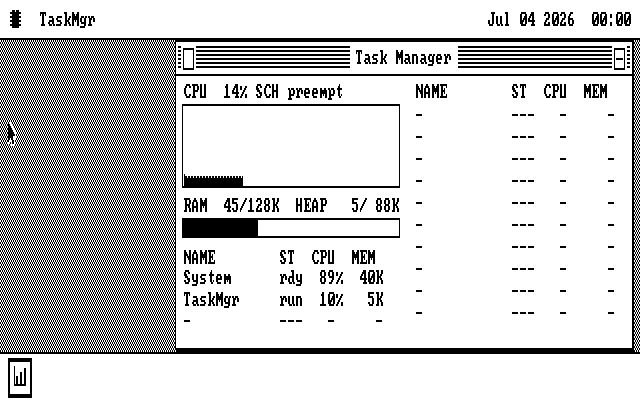
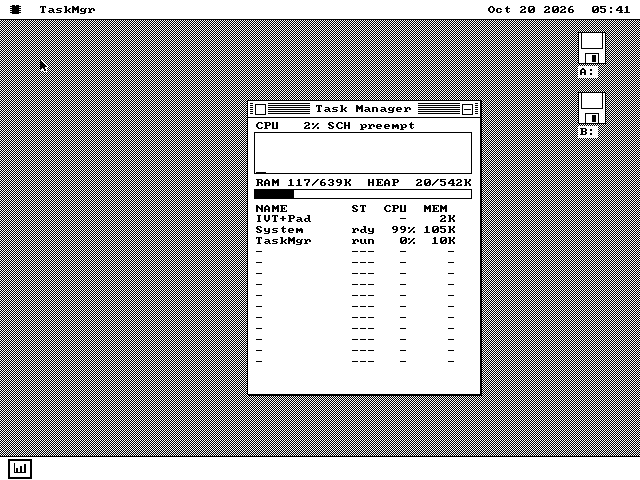
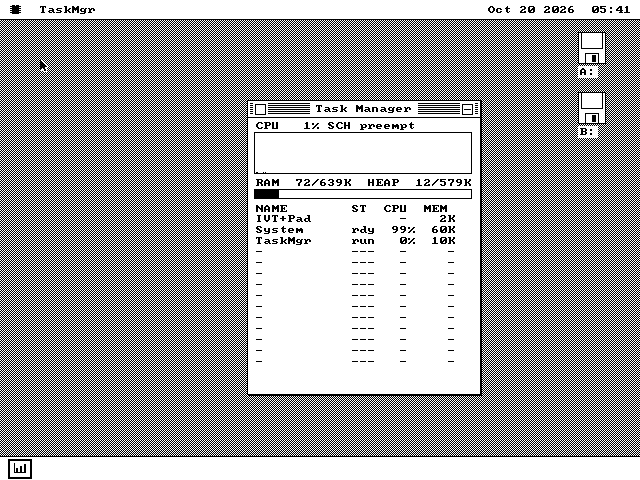
The 128KB pictures were taken in the MartyPC emulator, running an IBM PC 5150 with 128KB, a CGA card and the open-source GLaBIOS, with the ROM image built from this release mapped where the five sockets answer. The HMA pictures were taken in QEMU. No picture here is of real hardware.
How it works
A ROM that checks the kernel before it is used, and the same thing loaded from a file.
The disk boots the same either way
The kernel ROM is laid out as an ordinary option ROM, the kind expansion cards use. The BIOS finds it at power-on. Early in the boot, os8088 looks for its own ROM at F4000. If one is there, the kernel hands it control for a moment.
There is no special disk for a ROM machine. Every system disk boots the same with or without one.
A wrong ROM is no ROM
The ROM changes nothing until three checks pass. Its copy of the 37KB part must match the one just loaded from the disk, byte for byte. A checksum over the rest of the kernel must match. And every place it is about to redirect must still hold the value it expects.
Only then does it point the kernel at itself, and the memory that part used becomes free. If any check fails, the machine boots exactly as it would with no ROM.
Parts of the system, without the system disk
os8088 keeps some features in separate files on the system disk, read in when you ask for them. Any room left in the 40KB holds copies of those files.
The small kernel's ROM holds five: the file dialog, the code behind Cut, Copy and Paste of files, the Control Panel, the disk formatter and the Task Manager. On a 128KB machine with one floppy drive, you can take the system disk out and still use Save As onto a data disk. Without the ROM, that is refused. The standard kernel's ROM has room for one, the code that spreads the desktop across two monitors.
The same thing, from a file
Every standard system disk carries a 3KB file, COLDHMA.SYS. It is the
ROM's checking code without the ROM. On a 286 or later with memory above 1MB, the driver
for that memory switches A20 on, loads the file and copies the 37KB part up. It makes the
same checks, and reads the copy back, before it changes anything.
The 24,560 bytes left below it hold drivers. The sound, hard disk and parallel-link drivers load there when they are turned on, and so does the sound driver's 8KB playback buffer.
What it costs
On the 5150 itself, nothing in speed. Its ROM chips answer within the processor's normal memory cycle, so code runs from them as fast as from RAM. In the standard kernel, the support for both takes under 250 bytes. On a machine with the HMA, most of that is above 1MB too.
With the ROM installed, Cassette BASIC is gone. If the machine is turned on with no disk,
it says Insert a system disk and press any key. where it would have started
BASIC.
What it does not do
A ROM is cut for one kernel, and some machines cannot take one.
- A ROM serves one exact build of the kernel. The 37KB part reaches the rest of the kernel by address, so almost any change to the kernel changes it. During development a programmed ROM lasted about two or three kernel changes. A ROM from an older or newer build fails its checks and is ignored, so it costs its memory saving and never a boot. Build the ROM from the same release as the disks it will meet.
- It does not make the machine start faster. The 37KB part is still read from the disk, because the ROM's first check compares against that copy.
- Copies in the ROM are copied, not run in place. A feature taken from the ROM still uses RAM while it is open. What it saves is the disk read and the need for the system disk. Apart from the small kernel's Task Manager, programs and drivers are not put in the ROM, because a copy would save no memory.
- Not every PC can take a ROM. It needs a 5150 with the IBM BIOS dated 10/27/82, or GLaBIOS. The two earlier IBM BIOSes, 04/24/81 and 10/19/81, never look for an option ROM. The PC/XT 5160 is a poor host: on its first board BASIC shares a chip with the BIOS, and its later boards check the whole 64KB of ROM and stop on a mismatch.
- The sockets take 24-pin 2364 mask ROMs. A 2764 or 27C64 EPROM, the common programmable kind, has 28 pins and needs an adapter. The project's own 5150 uses two One ROM boards, which are flashed over USB.
- The HMA needs the standard kernel and a 286 or later with memory above 1MB. An 8088 has no A20 line, so on the machine os8088 is written for, the ROM is the only way.
- Hibernate notices. A hibernate file records where that 37KB part was running: in RAM, in ROM or in the HMA. It resumes only on a boot where it runs from the same place.
Try it yourself
The HMA needs nothing but the right machine. A ROM needs a programmer, or an emulator.
The HMA, on a 286 or later
-
Boot any standard os8088 system disk on a 286 or later with memory above 1MB. There is no setting to change. QEMU's default machine qualifies, and so do the 286 and 386 setups that come with the source.
-
Open the Task Manager from the System menu, under the chip in the top-left corner, and read the
HEAPfigure. -
To move a driver up as well, turn on Sound, Hard Drive or os88net in Control Panel › Drivers. A machine with a sound card finds it by itself.
The ROM, on an IBM PC 5150
-
Test the sockets first. In the os8088 source, this builds a ROM with no os8088 in it, only a test pattern:
make socketromProgram its five 8KB files into U28 to U32 and power on. The start-up screen should print
U28 oktoU32 ok. A socket with a bad chip or a bad connection is named. -
Build the kernel ROMs from the same source as your disks:
make romIt writes one ROM for each kernel into
build/rom/: the whole 40KB image, and one 8KB file per socket, from-U28.binto-U32.bin. -
Program the five socket files into U28 to U32, in place of Cassette BASIC.
-
Boot the system disk from the same build. The standard kernel's ROM pairs with the standard disks, and the small kernel's with the disks
make smallbuilds. Open the Task Manager to see the difference.
ROMs are not in the release download. A ROM has to match its disks exactly, so you build it yourself from the source of the release you are running.