Spotlight › Covox
The Covox: digital sound from a printer port
The Covox Speech Thing was a plug for a PC's printer port that turned the eight bits written to it into a sound. os8088's music player, music module player, WAV player and video player can all play through one now, chosen on one line of the Control Panel.
- parts in a Covox
- 8 resistors
- printer ports offered
- 3
- players that use it
- 4
What a Covox is
A sound card with nothing on it but the part that makes the voltage.
Digital sound is a list of numbers, one for each moment, each saying how far the speaker cone should be pushed out or pulled in. Something has to turn each number into a voltage. That part is a digital-to-analog converter, or DAC.
A PC's printer port has eight data lines, and a program can set all eight at once by writing one byte. In 1986 Covox sold the Speech Thing: a plug for the printer port with eight resistors inside, wired so that each line adds twice as much voltage as the one before it. Write 0 and the output is at its lowest; write 255 and it is at its highest; write 128 and it sits in the middle. That is a DAC, and it cost a fraction of a sound card. Clones were built at home from a handful of parts, and DOS music programs of the late 1980s and early 1990s supported it.
It has none of the rest of a sound card. There is no memory for samples, no clock and no way to ask for the next one. The computer has to write every sample itself, at exactly the right moment -- eight thousand times a second for telephone-quality sound. And because it is only resistors, it cannot be detected: it answers exactly as an empty printer port or a printer does. So os8088 asks you instead.
How os8088 drives it
One setting, and the players do the rest.
You say where it is
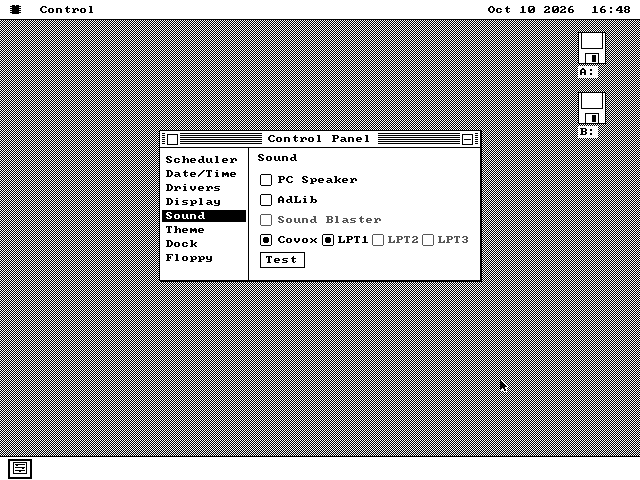
Control Panel's Sound page has a Covox row with three buttons, LPT1, LPT2 and LPT3. The sound driver tests each printer port when it starts, and a button is greyed unless its port is really there. The test writes two values to the port and reads them back, and sends nothing a printer would print.
Why the port is a choice
A Hercules graphics card has a printer port of its own, and the PC numbers it LPT1. On those machines a Covox on a separate printer card is LPT2. Taking the first port that answered would have sent the sound to the wrong one.
The players
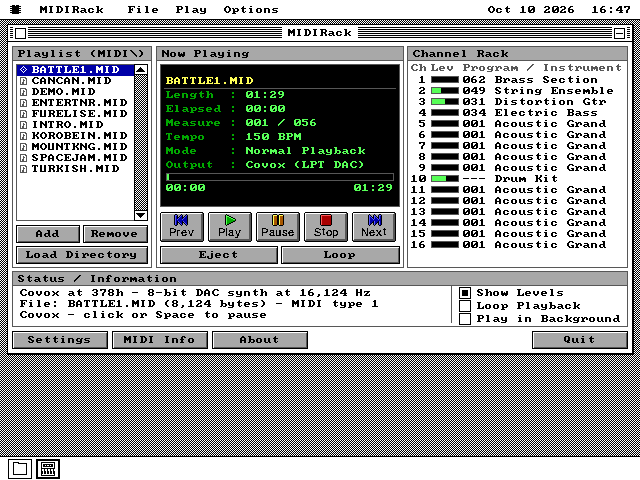
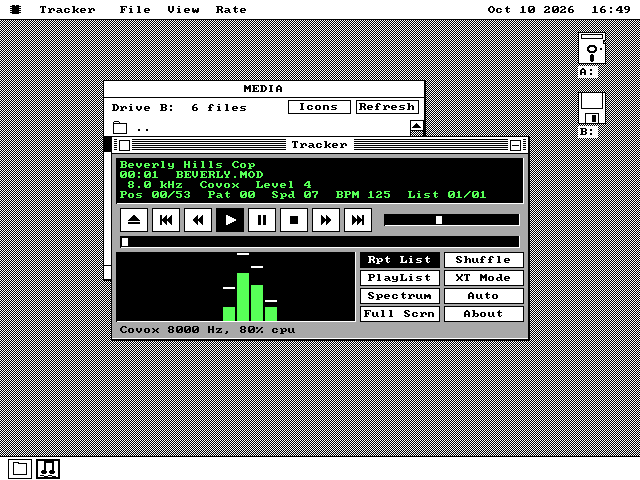
MIDIRack plays MIDI music through it, Tracker plays music modules, Audio plays WAV files, and the Video Player plays a video's sound. Each one names the Covox in its status line, so you can see where the sound is going.
The AdLib stays
An AdLib card and a Covox side by side was a common machine. Choosing the Covox keeps the AdLib's FM chip for music and turns off only a Sound Blaster's digital sound, because you asked for the printer port instead.
See it running
The setting, and a music module playing through it.
On a 4.77 MHz PC
Writing every sample is most of what an 8088 can do.
Each sample arrives by an interrupt from the PC's timer: the processor stops what it is doing, writes the byte, and goes back. On a 4.77 MHz 8088 that round trip costs about 425 clock cycles however little the code inside does, and at 11,025 samples a second there are only 433 cycles between samples. So an IBM PC cannot play a Covox at that rate by interrupts and do anything else.
For MIDIRack there is a second way. Instead of an interrupt for each sample, the player keeps reading the timer while it works out the sound, and writes every sample that has fallen due since the last time it looked. Nothing is lost when it looks late; the samples are only late. On an emulated IBM PC that keeps the original's timing to the cycle:
| MIDIRack on a 4.77 MHz PC | Sample rate | The window while it plays |
|---|---|---|
| Automatic, by interrupts | 6,214 Hz | updates |
| A rate chosen in Settings, by reading the timer | 6,520 Hz | waits |
Tracker gained nothing from the second way and still uses interrupts; it plays BEVERLY.MOD at 5,512 Hz on the same machine. A music module at 11,025 Hz is past a 4.77 MHz 8088 whatever the sound comes out of: mixing its four channels alone takes 82 percent of the machine. On a 286 or later, MIDIRack plays the Covox at 16,000 Hz.
None of this costs the rest of the system anything. The sound driver grew by 252 bytes and the core of os8088 by none.
What it does not do
Relatives of the Covox that are not supported.
Stereo-on-1, which puts two Covox ladders on one port for left and right, and the Disney Sound Source, which added a small buffer and a fixed 7 kHz clock, are different devices and are not supported. A Covox plays one sound at a time: while music is playing, a beep from another program does not sound over it.
Nothing can find a Covox by itself, so nothing will use one until you pick it on the Sound page.
Using it
Plug it into a printer port, then tell the Control Panel which one.
-
On a machine with no sound card, the sound driver is not started at boot. Turn it on once in Control Panel, Drivers.
-
Open Control Panel, Sound, and click the LPT button for the port the Covox is plugged into. The buttons for ports the machine does not have are greyed.
-
Play something. MIDIRack's Automatic setting uses the Covox when the machine has no FM chip, and its Settings can pick it by name otherwise. Tracker, Audio and the Video Player use it whenever it is chosen. Each says Covox in its status line.
-
In an emulator: 86Box calls its Covox an LPT DAC and DOSBox calls it covox. The os8088 source tree has an 86Box machine set up for it, a 4.77 MHz XT with a Covox on LPT1 and a disk of music to play:
make xt-covox.