Download os8088
Four raw floppy images. Two of them are boot disks carrying the same 14,376-byte kernel -- one laid out for a 1.44MB drive, one for the 360KB 5.25" disks an IBM PC/XT can actually read. The other two are the software disk that holds Minesweeper and HELLO, in the same two geometries.
There is no installer and nothing to unpack. Write an image to a disk, or hand it to an emulator as drive A:, and it boots.
The four images
The SHA-256 column shows the first 16 hex characters of the full 64-character digest. This table is generated from the release manifest at build time, so it always describes the bytes actually being served. The software disks hold MINES (1,593 bytes) and HELLO (171 bytes).
Release v1.0.20260726, built 2026-07-26 from 16672e002.
| File | What it is | Size | SHA-256 (first 16) |
|---|---|---|---|
| os8088.img | Boot disk, 1.44MB geometry: 80 cylinders, 2 heads, 18 sectors per track. For QEMU. | 1,474,560 bytes | bdbd41f41b14dff0 |
| os8088-360.img | Boot disk, 360KB geometry: 40 cylinders, 2 heads, 9 sectors per track. For 86Box and real XT hardware. | 368,640 bytes | 42f1beb5355ad199 |
| apps.img | Software disk, 1.44MB: an os88fs volume holding MINES and HELLO. Not bootable. | 1,474,560 bytes | e535aad8a5ae9a87 |
| apps360.img | Software disk, 360KB. The same two packages, same filesystem, different geometry. | 368,640 bytes | 049486a249192380 |
Which one do I want?
- QEMU -- take the 1.44MB pair:
os8088.imgas drive A:,apps.imgas drive B:. - 86Box, or a real IBM PC/XT -- take the 360KB pair:
os8088-360.imgandapps360.img. A 1.44MB drive postdates the 8086 by years and an XT BIOS knows nothing about that format.
The two boot disks contain identical kernels. The only difference is the boot sector, which is assembled with the disk's sectors-per-track and head count baked in so it can turn a sector number into a cylinder, head and sector for the BIOS.
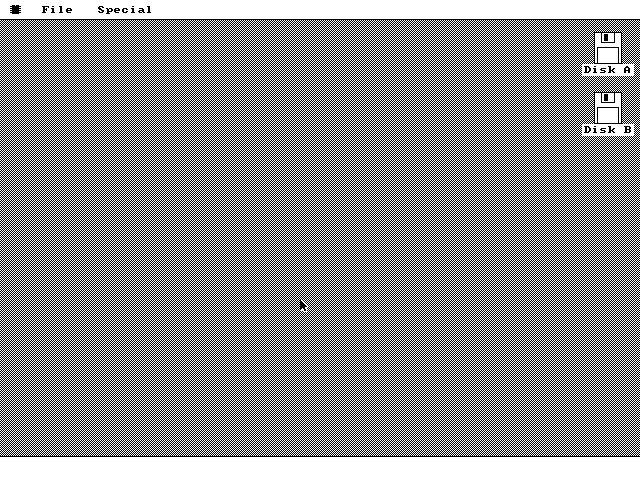
You need the matching software disk in the second drive to get Minesweeper. os8088 boots and runs perfectly well without one -- you just get a Disk window with nothing in it, because there is no program floppy to list.
Running it in QEMU
This is the command the repository's make run target issues, with the
paths spelled out:
qemu-system-i386 \
  -drive file=os8088.img,format=raw,if=floppy -boot a \
  -chardev msmouse,id=m0 -serial chardev:m0 \
  -drive file=apps.img,format=raw,if=floppy,index=1
The two -chardev and -serial arguments are not optional.
QEMU's msmouse backend emulates a Microsoft serial mouse on COM1, which is
the only pointing device os8088 has a driver for. Leave them out and the machine boots
to a desktop with no cursor and no way to open a menu, because every launch path in the
system goes through the mouse.
index=1 puts the software disk in the second floppy slot. That is drive
B:, which is where the Disk window looks first.
Click into the window to give QEMU the pointer, and the arrow on the desktop starts following it. Menus are press-drag-release, the way they were on a Macintosh: hold the button down in the menu bar, drag onto the item, let go.
Running it in 86Box
86Box emulates the period machine rather than a generic PC, so this is the closer
approximation of what os8088 was written for. The configuration checked into the
repository at vm/xt/86box.cfg is:
| Machine | IBM PC/XT (machine = ibmxt) |
|---|---|
| CPU | Intel 8088, no dynamic recompilation |
| Clock | 4,772,728 Hz -- 4.77MHz, the stock XT crystal divided down |
| RAM | 256 KB |
| Video | Oak OTI-067, an 8-bit ISA VGA card |
| Keyboard | PC/XT |
| Mouse | Microsoft serial (msserial), on COM1 |
| Floppy 1 | os8088-360.img, mounted write-protected |
| Floppy 2 | apps360.img, mounted write-protected |
VGA arrived in 1987, nine years after the 8086, but 8-bit ISA VGA cards did work in XTs. It is a legitimate if slightly fancy period configuration, and mode 12h is a VGA mode -- an EGA card tops out at 640x350 and cannot run this at all.
Repaints at 4.77MHz are slow, and that is the hardware. A window opening, a menu closing or the Task Manager redrawing its list takes long enough that you watch it happen row by row. Nothing is wrong. There is no back buffer -- an off-screen copy of a 640x480 16-color screen is 153,600 bytes, more than half the machine's memory -- so every pixel is composited live on the visible display, at the speed an 8088 can push bytes at an ISA card. In QEMU the same code is instant.
Every change is tested in QEMU. The 360KB images boot in 86Box on the configuration above; real XT hardware is what the system targets, not what it is regression-tested on.
Writing to real media
The 360KB image is 720 sectors of 512 bytes, laid out as 40 cylinders, 2 heads and 9 sectors per track. It goes on a double-density 5.25" disk, written by a drive that can write that format, and it is a sector-for-sector copy -- no filesystem tool is involved because there is no DOS filesystem on it.
dd if=os8088-360.img of=/dev/fd0 bs=512Check the device name before you press Return.
dd writes to whatever you name in of= and asks no questions.
Name the wrong device and you overwrite that disk, including the one you booted from.
List the devices first -- lsblk on Linux, diskutil list on
macOS -- confirm the size matches a floppy, and unmount it before writing.
Two things that do not work, stated plainly:
- You cannot write the 360KB image to a 1.44MB disk and have an XT read it. An XT's drive is a 5.25" 360KB unit and its BIOS has no notion of 1.44MB media; on top of that, the boot sector in that image asks the BIOS for 9 sectors per track, which is not the geometry a 1.44MB disk is formatted with.
- A 1.2MB high-density 5.25" drive can write 360KB-format disks, but it writes narrower tracks than a real 360KB drive does. Disks made that way are frequently unreadable in period hardware. If the XT will not boot a disk that looks fine on your modern machine, this is usually why -- write it in a genuine 360KB drive.
Put the boot disk in A: and the software disk in B:. With one drive, os8088 still boots; the desktop just shows a single floppy icon and there is no program disk to load from.
Building from source
git clone https://github.com/jggonz/os8088.git
cd os8088
make
That writes all four images into build/, along with the intermediate
kernel.bin (14,376 bytes) and boot.bin, which the Makefile
checks is exactly 512 bytes and fails the build if it is not.
The dependencies are nasm, qemu-system-i386 and
python3. NASM assembles the kernel, the boot sector and the packages;
Python builds the os88fs software disk and stamps the relocation tables into the
packages; QEMU is only needed to run the result. There is no linker anywhere in
the build -- every binary is nasm -f bin flat output, which is
deliberate, because a linker on a modern Mac only emits Mach-O. 86Box is optional, and
only for make xt.
make | Build all four floppy images into build/. |
|---|---|
make run | Boot the 1.44MB pair in QEMU with the emulated serial mouse attached. |
make test | Boot headless with a QMP control socket at build/qmp.sock, for scripted clicks and screendumps. |
make debug | Boot with QEMU halted, waiting for gdb on port 1234. |
make xt | Boot the 360KB pair in 86Box using vm/xt/86box.cfg. |
make clean | Remove build/. |
The kernel is assembled with cpu 8086 and -w+error, so any
instruction newer than 1978 is a build failure rather than a surprise on real hardware.
If your build succeeds, it runs on an 8088.
The source is at github.com/jggonz/os8088, under the MIT license.
What you need to run it
| CPU | Intel 8086 or 8088 | Nothing newer is required and nothing newer is used. A faster x86 runs it too, in real mode. |
|---|---|---|
| RAM | 256 KB | The kernel and every buffer it statically reserves come to 38,977 bytes; loaded programs get a 20,480-byte pool above that. |
| Video | VGA | Mode 12h, 640x480 in 16 colors. An 8-bit ISA VGA card in an XT is fine. CGA, MDA and EGA are not -- none of them have this mode. |
| Mouse | Microsoft serial mouse on COM1 | Port 0x3F8, IRQ 4, 1200 baud 7N1, three bytes per report. Required: there is no keyboard route into the menus, so with no mouse nothing can be launched. |
| Keyboard | Any PC keyboard | Read through BIOS int 16h. Used for typing into the Note Pad and for Minesweeper's F and N keys, not for navigation. |
| Drives | One floppy to boot, two to be useful | A: is the boot disk, B: is the software disk. There is no hard disk support, no CD and no network boot. |
Then what
Pull down the File menu and open a Note Pad, a Clock and a couple of Bounce windows, then drag one of them around by its title bar. The clocks keep time and the balls keep moving underneath the drag, which is the whole argument the project is making.